
Fees
The Fees section allows you to view your fee statements, check payment history, and make payments for school-related expenses.
Accessing Fees
- Click "Fees" in the sidebar navigation
- Your fee dashboard will be displayed
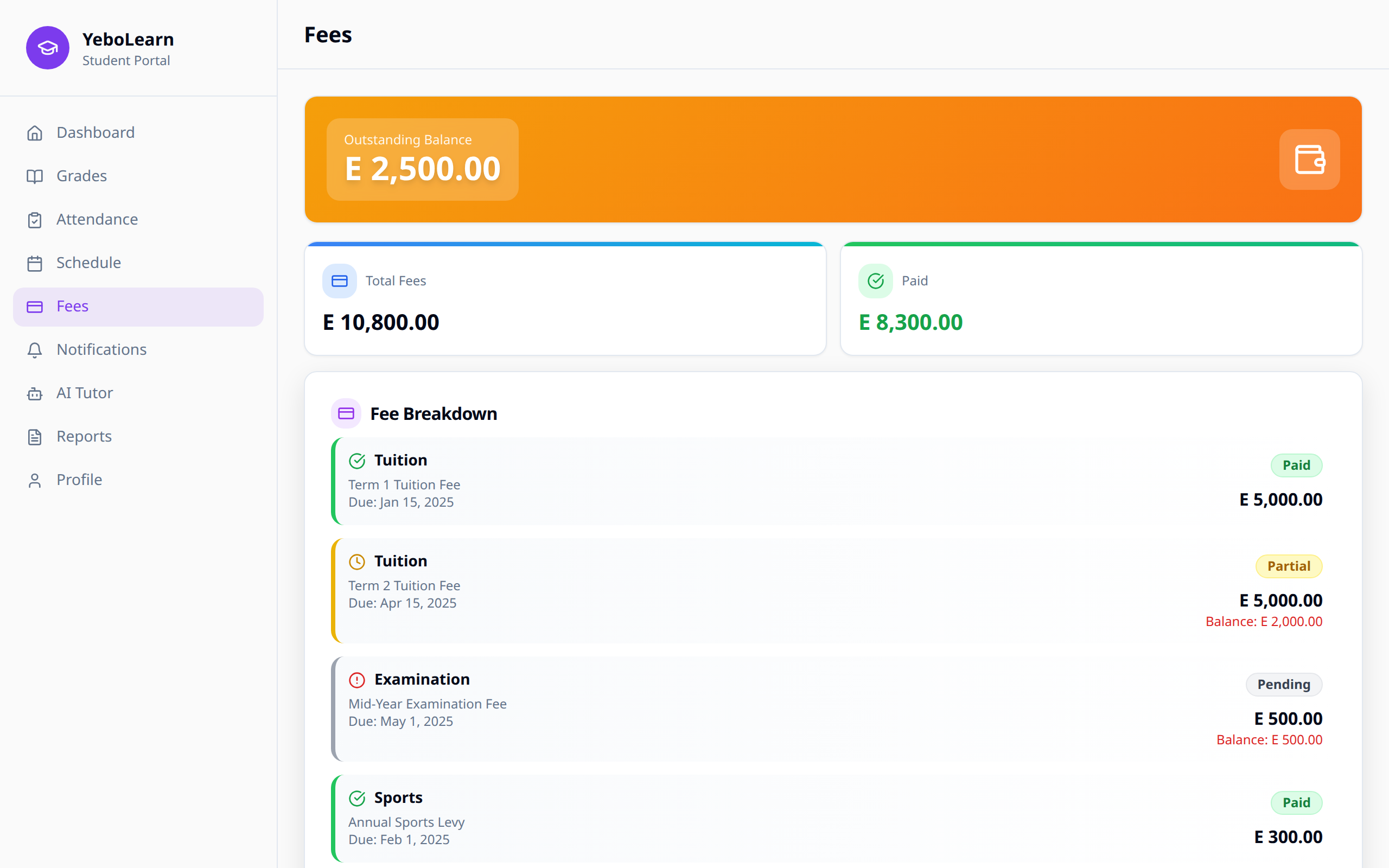
Fee Overview
Summary
At the top, you'll see:
- Total fees - Total amount for the term/year
- Amount paid - What you've already paid
- Balance due - Outstanding amount
- Due date - Payment deadline
Fee Status
| Status | Description | Color |
|---|---|---|
| Paid | Fully paid | Green |
| Partial | Some amount paid | Yellow |
| Pending | No payment made | Orange |
| Overdue | Past due date | Red |
Fee Breakdown
Viewing Fee Items
Click on "View Details" to see:
- Tuition fees
- Lab fees
- Library fees
- Sports fees
- Transport fees
- Uniform fees
- Other charges
Fee Categories
Fees are typically categorized as:
| Category | Description |
|---|---|
| Mandatory | Required fees (tuition, exams) |
| Optional | Elective activities (sports, clubs) |
| One-time | Registration, admission fees |
| Recurring | Monthly or term-based fees |
Making Payments
Payment Methods
Available payment options (varies by school):
- Mobile Money (MTN, Airtel, etc.)
- Bank Transfer
- Credit/Debit Card
- Cash (at school office)
How to Pay Online
- Click "Pay Now" or "Make Payment"
- Enter the amount to pay (full or partial)
- Select your payment method
- Follow the payment provider's instructions
- Wait for confirmation
Payment Confirmation
After successful payment:
- Confirmation message displayed
- Receipt number provided
- Email confirmation sent
- Balance updated automatically
Payment History
Viewing Past Payments
Access your payment records:
- Payment date
- Amount paid
- Payment method
- Receipt number
- Transaction status
Downloading Receipts
To download a receipt:
- Go to Payment History
- Find the transaction
- Click "Download Receipt"
- Save the PDF file
Fee Statements
Generating Statements
To get a fee statement:
- Click "Fee Statement"
- Select the period (term/year)
- Click "Generate"
- Download or print the statement
Fee Reminders
Notifications
You'll receive reminders for:
- Upcoming due dates
- Overdue payments
- Payment confirmations
- Fee structure changes
WARNING
Late payments may result in penalties or restricted access to certain services. Check your school's policy.
Troubleshooting
Payment Failed
If your payment fails:
- Check your payment method has sufficient funds
- Verify the payment details are correct
- Try a different payment method
- Contact school administration if issues persist
Payment Not Reflected
If payment isn't showing:
- Wait a few minutes (processing time)
- Check your email for confirmation
- Refresh the fees page
- Contact support with your receipt/reference number
Tips
- Pay early - Avoid last-minute rush
- Set reminders - Mark due dates on your calendar
- Keep receipts - Save all payment confirmations
- Check regularly - Monitor your fee status
- Ask questions - Contact school for fee clarification